Technical Tip: Usage of ‘fnsysctl’ command with examples and requirements
This article is a rewrite of a technical tip produced by Fortinet. You can view that technical tip by clicking on the link above.
The fnsysctl command is frequently useful for advanced troubleshooting on FortiGate, as it gives you some insight into the underlying Linux based OS.
Important facts about the fnsysctl command:
- Login must be performed using a user account with the super_admin profile.
- On FortiGate Virtual Machines, a regular (paid) license is required. Free evaluation VM instances will return the following error: Unknown action 0.
- This is a CLI-only command and has no graphical equivalent in the GUI.
- The command executes locally on the FortiGate device where the session is initiated. To run it on a passive member of a high-availability cluster, log in directly to the passive unit.
- Tab completion does not work with this command.
- The command can be used within automation stitches by configuring a set action-type cli-script.
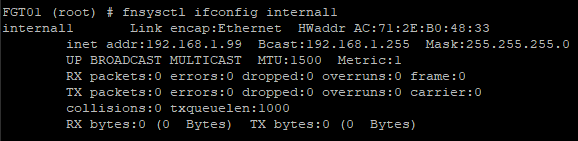
fnsysctl ifconfig
Shows detailed info on the physical interfaces, including drops/errors/MTU. Accepts optionally the name of the interface, for example, fnsysctl ifconfig internal1.
fnsysctl ls
Lists files/folders in the filesystem. Useful for post-incident investigation of FortiGate compromises, looking for a given CVE indicators of compromise (IOCs).
It accepts only 3 flags:
- a – Show all files, including those starting with the dot in their name.
- l – Show long output, i.e., not only names but timestamps, sizes.
- A – almost all, do not show names starting with the dot (default, so it is not necessary to specify).
Examples:


fnsysctl cat
Show contents of a file; not all files in the filesystem are accessible. Some examples.
- When trying to access a prohibited file:
FGT-Perimeter # fnsysctl cat /tmp/cw_ac_key_bak.pem
cat: /tmp/cw_ac_key_bak.pem: Not allowed
- Show open TCP connections to/from FortiGate itself:

The output is in hex, so it is much easier to use diagnose sys tcpsock | grep 0.0.0.0.
- Show CPU info:

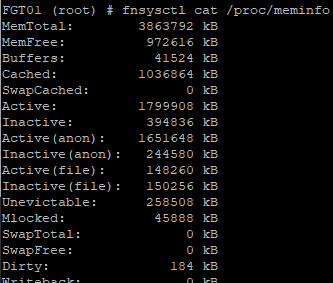
- Get memory information:
- Show nturbo acceleration statistics
fnsysctl cat /proc/nturbo/<n>/drv:
fnsysctl cat /proc/nturbo/<0>/drv
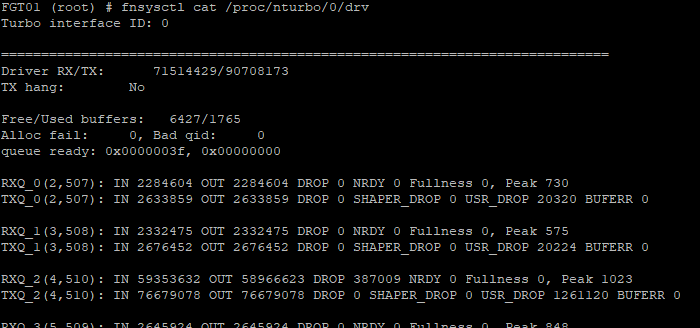
To decipher the output, see this article: Technical Tip: Useful diagnostics commands for troubleshooting NTurbo related issues.
fnsysctl date
Show date in the Linux format, ignoring any options.
FGT-Perimeter #  fnsysctl date
Wed Oct 23 02:11:03 PDT 2024
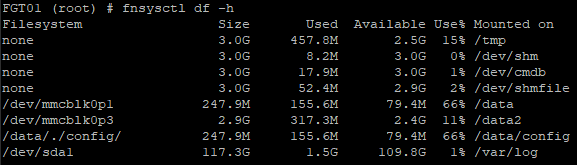
fnsysctl df
Show filesystem usage, useful when hard disks are attached to the FortiGate.
fnsysctl du
Shows directory usage, accepts the following options:
- -d n – Limit depth to n levels deep.
- -a – Show/count files as well, not only directories.
- -s – Show only the summary usage of all directories/files.
- -L – Follow all symlinks.
Examples:
FGT-Perimeter #  fnsysctl du -s
715312  .
FGT-Perimeter #  fnsysctl du -L
4       ./new_root/eap_proxy_worker/fortidev/etc
4       ./new_root/eap_proxy_worker/fortidev
1256    ./new_root/eap_proxy_worker/etc/cert/ca
1256    ./new_root/eap_proxy_worker/etc/cert
1256    ./new_root/eap_proxy_worker/etc
0       ./new_root/eap_proxy_worker/dev/pts

...cut...

0       ./dev/shm/ips001
0       ./dev/shm/ips002
0       ./dev/shm/ips
3280    ./dev/shm
3280    ./dev
85811852        .
FGT-Perimeter #  fnsysctl du -d 1 -a
71960   ./new_root
20488   ./migadmin
5344    ./node-scripts
113596  ./bin
0       ./proc
0       ./fortidev
131464  ./data
142520  ./data2
0       ./boot
24      ./sbin
0       ./lib64
147440  ./tmp
11324   ./var
0       ./init
452     ./usr
0       ./etc
0       ./sys
67432   ./lib
0       ./root
3280    ./dev
715324  .
fnsysctl pwd
Show the current working directory. Not very useful as the CD is not accessible and the directory cannot be changed.
FGT-Perimeter # fnsysctl pwd
/
fnsysctl ps
List running processes. Useful together with the next command kill for restarting some stuck process on FortiGate. Most of the processes in FortiGate are run via Watch Dog, which means killing them will shut down the running process and restart it immediately later.
FGT-Perimeter # fnsysctl ps
PID       UID     GID     STATE   CMD
1         0       0       S       /bin/initXXXXXXXXXXXXXXXXXXXXXXXXXXXXXXX
2         0       0       S       [kthreadd]
3         0       0       I       [rcu_gp]
4         0       0       I       [rcu_par_gp]
6         0       0       I       [kworker/0:0H-kblockd]
8         0       0       I       [mm_percpu_wq]
9         0       0       S       [ksoftirqd/0]
10        0       0       I       [rcu_sched]
11        0       0       I       [rcu_bh]
12        0       0       S       [migration/0]
13        0       0       I       [kworker/0:1-events_power_efficient]
14        0       0       S       [cpuhp/0]
15        0       0       S       [cpuhp/1]
16        0       0       S       [migration/1]
17        0       0       S       [ksoftirqd/1]
19        0       0       I       [kworker/1:0H-kblockd]
20        0       0       S       [kdevtmpfs]
32        0       0       I       [kworker/1:1-events]
37        0       0       I       [kworker/1:2-mm_percpu_wq]
217       0       0       I       [kworker/u4:2-fortilink]
345       0       0       S       [khungtaskd]
346       0       0       S       [oom_reaper]

...cut...

2019      0       0       S       /bin/autod
2020      0       0       S       /bin/cloudapid
2021      65530   65530   S       /bin/eap_proxy
2026      0       0       S       /bin/dnsproxy
2045      0       0       S       /bin/wad 4
2046      0       0       S       /bin/wad 5
2047      0       0       S       /bin/wad 6
2048      0       0       S       /bin/wad 12
2049      0       0       S       /bin/wad 13
2050      0       0       S       /bin/wad 14
2051      0       0       S       /bin/wad 9
2052      0       0       S       /bin/wad 18 0
2053      0       0       S       /bin/miglogd 1
2095      0       0       S       /bin/ipsengine
2096      0       0       S       /bin/ipsengine
2119      0       0       S       /bin/urlfilter 0
2123      65531   65531   S       /bin/imi -L 2
2124      0       0       R       /bin/sshd
2125      0       0       S       /bin/newcli
2204      0       0       I       [kworker/u4:1-events_unbound]
2319      0       0       I       [kworker/u4:0-events_unbound]
2325      0       0       S       /bin/httpsd
fnsysctl kill
Kill a process by its ID (PID). The only option accepted is -s N, where N is the signal number to send as per Linux. Using the output of the fnsysctl ps above, httpsd (Admin GUI process) can be killed as follows:
fnsysctl kill 2325
There are usually multiple processes for the same function, so it is more practical to use the next command instead – fnsysctl killall.
fnsysctl killall
Kill/restart a process by name. The only option is the name of the process. The example above for killing all httpsd processes will be:
FGT-Perimeter # fnsysctl killall httpsd
- When using killall, it is not recorded in the crash log file (read with diagnose debug crashlog read).
- Not all processes can be killed with it, for example, hasync.
fnsysctl mv
Move the file in the filesystem. Most of the directories on the FortiGate are read-only, but some, like tmp, are not. This command will ask for the username/password explicitly.
FGT-Perimeter # fnsysctl mv  /tmp/ipsshm.urldb-whitelist /tmp/ipsshm.urldb-whitelist.orig
Admin:admin
Password:
FGT-Perimeter # fnsysctl ls -al  /tmp/ipsshm.urldb-whitelist.orig
-rw-r--r--    1 0        0       Wed Oct 23 02:15:02 2024           810912 /tmp/ipsshm.urldb-whitelist.orig
Warning: With file moves as FortiGate may stop functioning if a crucial file is deleted.
The obvious use for this command is for attackers who have broken into FortiGate to hide their traces.
fnsysctl printenv
The only environment variable I was able to catch with this was the type of Terminal used.
FGT-Perimeter # fnsysctl printenv
TERM=vt220
fnsysctl grep
Search the contents of a file/files. The usual grep options are available:
        -i      Ignore case distinctions
        -l      List names of files that match
        -H      Prefix output lines with filename where match was found
        -h      Suppress the prefixing filename on output
        -n      Print line number with output lines
        -q      Quiet
        -v      Select non-matching lines
        -s      Suppress file open/read error messages
        -c      Only print count of matching lines
        -A      Print NUM lines of trailing context
        -B      Print NUM lines of leading context
        -C      Print NUM lines of output context


 FCX Study Group
Leave a comment