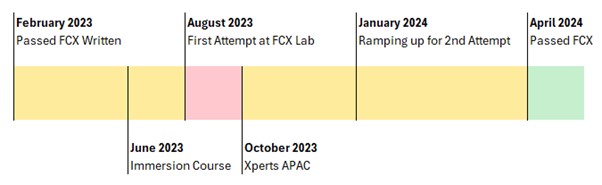
This is the second half of my last blog post on my journey to the FCX. My last post covered from when I passed the FCX written exam, through to just after I failed my first attempt at the lab. This post picks up from just after XPerts APAC in October, and goes through the rest of my journey. As with before the aim is to provide as much advice as I can for prospective FCX candidates within the bounds of the NDA.
Other posts in this series can be found here:
Post 1 – About the FCX
Post 2 – FCX Study Tracker
Post 3 – Andrew’s Journey to the Written
Post 4 – Lab Exam (Part 1)
Prep for the 2nd attempt
After the Fortinet Xperts APAC conference in October, I re-evaluated my approach to studying for the exam. From the experience I had gained through sitting the actual lab, completing the lab environments at the Xperts conference and competing in the UFC, It was clear to me that I needed to spend as much time “on the tools” as possible in as many different scenarios as possible. Putting myself under time pressures was also going to be key for success I felt.
Having taken time off for a vacation, the Xperts summit and for preparing for my first lab attempt, my workload had backed up so I knew between the end of October and the end of the year I would be working extra hours to ensure that I met deadlines. However, I wanted to make sure that I didn’t lose any of the progress I had already made for the FCX.
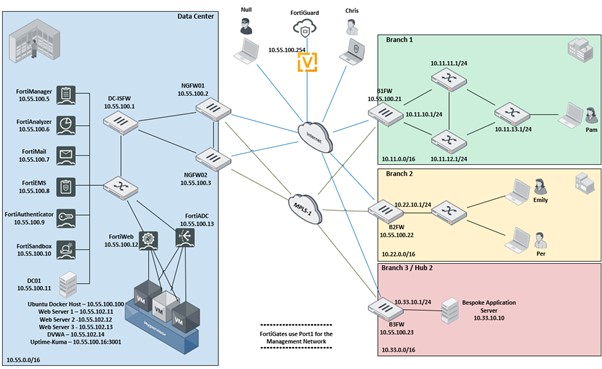
I set aside a day to plan out a lab topology that could be easily manipulated through config into different scenarios, and easily reverted to a blank slate through the use of config revisions or having saved a base configuration. The idea being that I wanted to spend as much time configuring solutions as possible and to avoid unnecessary troubleshooting to just get the lab working. In the end I came up with the following lab topology:
Lab Hardware
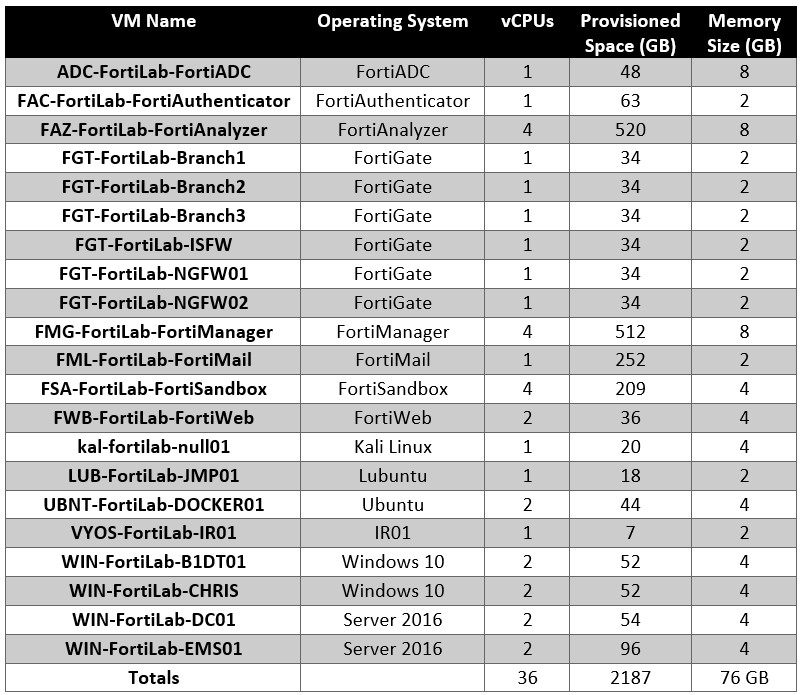
In order to build out this lab topology I needed the following resources on my hypervisor:
The lab includes a docker host, which runs the following services:
- Web Server’s 1, 2 and 3
- Uptime Kuma monitoring platform (To generate continuous traffic through the network)
- Damn Vulnerable Web Application – web server
The docker host utilised IPVLAN’s to allow the docker containers to sit on different networks / points throughout the topology. Using docker also saved significantly on required resources.
I built this out on my work’s lab environment, which consists of a couple of Dell R720’s with around 300GB of RAM in each, and 40 physical processor cores each. These servers were running VMWare ESXi 7.0 using some VMUG Membership licensing. You can read more about that here:
https://www.vmug.com/
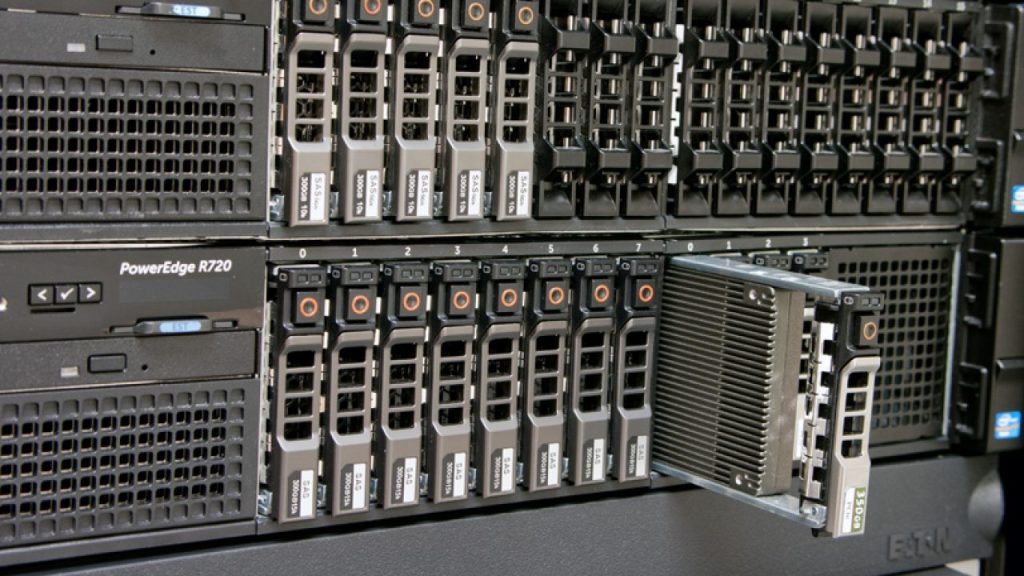
Honestly if I had my time again, I would probably run the servers using Proxmox. Fortinet’s internal labbing and testing runs on KVM (which Proxmox is based on) so you are likely to be able to find any image you need. Also you don’t have to mess around with the new Broadcom VMWare support portal.
Getting your hands on enterprise virtualisation hardware can seem pretty hard and expensive but there are tools out there to help you out.

If you haven’t come across it before, I highly recommend the site “Lab Gopher”
https://labgopher.com/
This site grabs results from eBay for different second hand servers, and rates them on a few different metrics to show you what is the best value for money. If you aren’t able to finance this sort of lab yourself Id encourage you to speak to your employer about what can be done.
Its good practice to have a lab environment anyway so that designs can be validated prior to going into production networks and so that changes in general can be tested. A virtualisation platform using EVE-NG / GNS3 / Bare Metal Hypervisor gives you a lot of flexibility to test these sort of things out.
If your workplace won’t help out, then I would suggest seeking out a study group, and seeing if they would be willing to pool funds / resources to build out a lab environment. Again because the environment is not Fortinet specific, the people pooling resources don’t need to all be studying the same thing in order to gain a real benefit.
The other component of this is licensing. There are three approaches you could take:
- The “rich kid” version – buy the products and have a production license for all of them. This may be within the reach of people studying for the exam who work for Fortinet, if the rumours of free licensing for employees are true.
- The “60-day-trial” version – Speak to your local Fortinet reps, in a lot of cases they can spin up 60-day trial licenses for you to use. This is the approach I took, and I’m fortunate to have an amazing local Fortinet team (shout out at the end of this post!) Fortinet are a company who value training so will help out where they can (just look at the fact the training videos are free!!)
- The “public trial” version – a lot of Fortinet products come with a limited trial which can be used for labbing (15-day trials, where encryption features are limited etc). The caveat for this is that some products have had their trial license changed in recent years to a model that is wholly unhelpful for people studying higher end Fortinet certs (The FortiGate trial from version 7.2 is fairly useless for anything other than FCA study). I plan on collating this information so that people don’t have to trawl through the product documentation to figure out what’s available – keep an eye on the blog for that future post.
Using any of these options though you can definitely get enough experience to pass the exam. In hindsight, Id also recommend mixing your lab with physical hardware where possible – you can reduce the FortiGate VM requirement significantly using VDOM’s on physical FortiGate’s for example.
Labbing

Once I had the topology set up and the hardware in place, I spent some time each and every day labbing up a different technology in a different scenario. Where I found the training telling me to not do something, I would do it. This was so that I recognised the symptoms when certain actions were taken and so that I knew how to back those problems out.
One downside of the FCX is even though there is a lot of material available to study for it, It doesn’t have the ecosystem around it that certifications like the CCIE do (I have some thoughts on this later on in the blog post). To help me with my studies, I went through CCIE R&S textbooks and adapted the lab exercises within to Fortinet products. The textbooks by Narbik Kocharians are an incredible resource in how they step you through topologies and help you think critically about what you are actually doing. My understanding of a lot of these topics was increased tenfold through doing these exercises and I highly recommend taking a look at his textbooks (especially the R&S 5.1 textbook).
If you are interested you can get this textbook on Amazon, but probably second hand via eBay too
https://www.amazon.com/CCIE-Routing-Switching-v5-1-Foundations/dp/1587144727
I’m not one to sit down and read heavily technical content for fun, but the Routing TCP/IP textbooks Jeff Doyle are the exception to this. I found myself reading through these all the time (including when at my son’s Gymnastics at times) as the way Jeff presents the content is incredibly engaging and for me at least explained things in a way that I could easily digest. I adapted scenarios within this book to my Fortinet studies as well.
If you are interested in reading these books, they are pretty easy to find on Amazon as well.
https://www.amazon.com.au/Routing-TCP-IP-Professional-Development/dp/1587054701
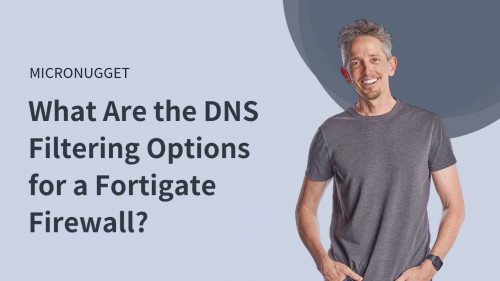
Another resource I used for my labbing was the CBTNuggets Fortinet courses by Keith Barker, which are incredibly engaging and provide some really good deployment examples, as well as their other courses for the CCIE and Palo Alto certifications. Adapting these concepts and exercises to Fortinet helped me think outside the box and understand the differences in the products.
For work I had to do some F5 LTM and AWAF training – the way they structure the labs can easily be modified for Fortinet products, and again gave me more scenarios to consider and lab up at home which helped immensely.
As I went, I recorded these exercises so that I could them repeat them later – The FCX guide outlines the minimum software version that will be used for products – I personally went through my exercises on each version from that minimum through to the current version (in my case 7.0 through 7.4). This was a lesson learned from my first attempt – I had assumed that the latest version would be used, and this came back to haunt me for some tasks.
For other parts of my study, I found excuses to include technologies from the blueprint in my home network environment (much to the chagrin of my fiancé) – I implemented IPv6 at home using IPv6 PD, I worked my way through the trials of that which have since informed my decisions and designs for clients so I found that to be particularly valuable. I also switched the VPN tunnels I have between my work lab environment and my home over to using IPv6 with BGP controlling the routing. This was basic but helped solidify concepts for me which definitely helped.
Lastly, I read through the PDF versions of the product administration guides – not only to lab up the concepts within, but to get used to their structure and to get used to finding things quickly. This is a skill that cannot be undersold for the FCX exam.
All in all, I would say that I completed 400-500 hours of labbing between October and the end of March – if you work day in and day out with just Fortinet equipment you will probably require far less study, but I was doing a lot of design work throughout this period which kept me off the tools for a lot of my working hours.
Other Preparations
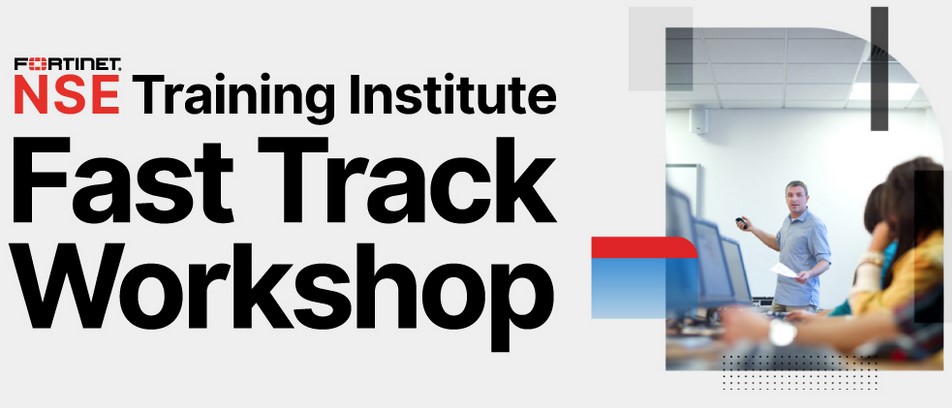
A resource that I find is often overlooked is the Fast Track training provided for free by Fortinet and its Distributors to customers and partners alike. Fast Track courses are a 2-4 hour session with generally around an hour of lecture followed by the rest of the time taken up in labs. The level of the session is aimed at below a FCP level of knowledge, but their value in FCX study comes from the lab time – it can give you ideas for labs for you to build out, give you a new perspective on how a product can be deployed, and generally expand your experience. Some of the experiences I gained through Fast Track courses helped me when taking my lab exams.
You can get further information on Fast Track courses here:
https://events.fortinet.com/fasttracks
Another useful resource for your studies is the Fortinet Developer Network – If you work for a partner, have an FCP or an FCSS, you are able to get a free account to the FNDN. Within there is the ability to spin up some free lab environments that you can work through on different Fortinet products. Personally I didn’t use these a whole lot, as I found the labs weren’t quite configured for what I needed at the time, however you may find it a useful resource for your studies.
The FNDN can be found here:
https://fndn.fortinet.net
Exam Experience

An improvement that Fortinet have made to their programme in recent years is moving the FCX lab online. This makes it far more accessible for people who live outside the regions where you would previously take the lab physically (France and the US) and significantly reduces the cost for people to sit the exam by removing the need to pay for travel and accommodation to the exam site. I cannot emphasize enough how good of a change this is, and cannot applaud them enough for taking this step.
However this means that you need to make certain preparations to your physical environment for taking the exam.
Physical Setup
Both times I sat the lab exam, I sat it from my workplace’s office. This had the advantage of being in a fairly ready made environment, free from child-made distractions which would impact on my ability to take the exam from home.
For the exam, you are allowed to use two monitors – one for you to complete the actual tasks, and one where you can have the questions open. If it is within your means, I highly recommend having your primary monitor as a wide screen / high resolution screen. This allows you to have multiple windows open within the exam jump host and makes completion of tasks a lot easier.
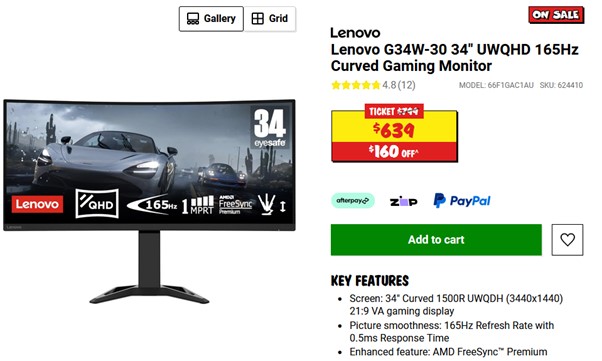
For my monitor setup, I used a Lenovo G34W-30 34 inch wide screen monitor, that I was able to find on sale for $500 AUD ($334 USD) as my primary monitor. This was the cheapest wide screen monitor I could find, and it has been a real asset ever since for both working from home, and for taking the lab exam.
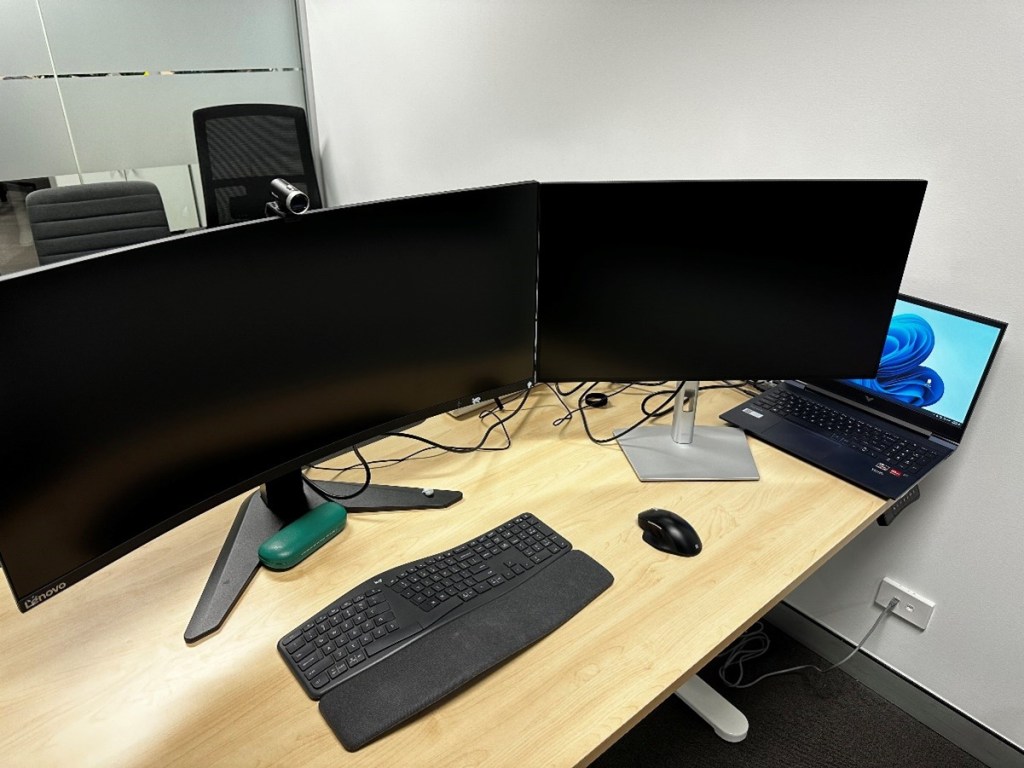
Obviously since you are using your own hardware, you can use your own keyboard and mouse for the exam. I found this to be extremely handy since I use ergonomic devices, meaning that my muscle memory wasn’t affected by an unfamiliar setup.
You need to show the proctor of your exam the room from multiple angles to show that you haven’t got anything there that’s outside the rules. This is far easier if you have a USB webcam, that you can pick up easily and move around.
Lastly – latency can be a real issue for this exam depending on where you are. Do yourself a favour and ensure that you have a wired network connection to your device to reduce latency as much as possible.
Exam Timing
The lab exam is broken into two sections – the first a 5-hour session, and the second a 4-hour session, with an hour in the middle for lunch. Within these sessions you can go for 2 x 10-minute toilet breaks after which the proctor will get you to show them the entire room again. Initial check-in can take up to 30 minutes (but generally is much quicker). You will get two appointments from ProctorU with your times, the second session is not scheduled until you have completed your first.
Overall, this means that you can be finishing your second exam anywhere between 10 to 11 hours after you initially start your exam. When you are booking your exam, take into consideration what times of day you work best. For my first attempt I scheduled the exam to start at 8:30am. I’m usually up from 5am and I quite often start work by 6am, so I thought I would give myself some time to set up, and then review my notes before starting into the exam.
This was a mistake.

The exam environment is stressful and draining. It is not a normal 11-hour workday.
By the end of my first attempt, I found myself completely drained, which made me sloppy toward the end of my second session. I have no doubt this was a major contributing factor to me failing on my first attempt.
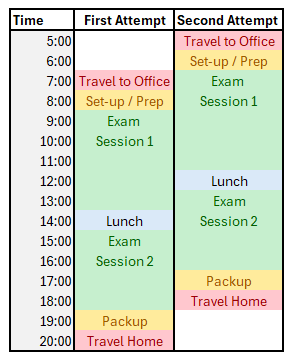
On my second attempt, I moved the start time to 6:30am which worked really well for me. I was a lot fresher, thought a lot clearer, and had far more energy once the second session came around which I flew through.
My advice is to consider when you are at your best during the day and schedule your exam to take advantage of that.
During my second attempt, one thing that came to me was that I was having a lot of fun. The first session of the exam had me flying through some tasks with ease with a massive smile on my face.
At the end of the first session I did feel a bit disheartened as I had fallen into the trap of spending too much time on a couple of tasks. I have a problem of getting tunnel vision sometimes and at the halfway point in the exam I felt it had probably cost me this attempt. I still went through the motions of taking notes during lunch about the session – what I did well, what I didn’t do well, taking the steps in case I failed so that I had somewhere to focus my studies.
When the second session came about I focused myself, and worked through each task in turn. Thankfully that feeling of having fun came back, and I was able to work through all of the tasks. I didn’t complete every task 100%, but I did remember to move on when I felt I was getting stuck and I believe this contributed significantly to me passing in the end.
Other tips and considerations for the FCX
It takes a village…

When deciding to go for an expert level certification your decision is going to have an impact on those around you. Your best chance at success for passing is to include others in your journey, for example some other people I included in my journey were:
Family
My fiancé and son – prior to starting to study I spoke with both Maddie and Theo about what it would entail, the extra study I would be putting in, some extra workload it would place on them, the stress it was likely to put me under and the potential financial impacts. I also spoke to them about the benefits of undergoing this and my “why” for wanting to do it. Without their buy in, I wouldn’t have been able to dedicate as much time to study as I did. Thank you, Madeline Gill and Theo, for your support and understanding throughout the process.
Before starting your own journey toward the FCX I’d highly recommend talking to your significant other as their support can make or break you from the very start.
Workplace – The bosses
For me, starting the journey toward the NSE8 / FCX began with an awkward conversation with my bosses where I told them I wanted to change my focus from doing a CCIE. They had already allowed me half a day a week for study for the prior 12-24 months (which admittedly I didn’t take advantage of enough) but they supported my decision without hesitation. They did everything they could to reduce barriers for me throughout the process by subsidizing my study, again providing study time, putting me in contact with people who they thought could help and by providing funding for a shared lab environment for all of us to use at CBR Cyber.
Moreover, the positive workplace they have built has made a huge difference. Thank you, Michael Honeyman and Andrew Weir, for your support. I couldn’t have completed this without you.
For anyone looking to start their own journey toward the FCX I’d recommend speaking to your bosses and seeing what can be done to help you. You gaining expertise required to obtain the FCX can only be a net-benefit not only from an efficiency standpoint but a point of differentiation against your competitors. Really, it’s a win-win for both parties, so have the conversation.
Workplace – Your co-workers
One of the best ways to learn is to teach others, so I spent a fair amount of time trying to convert the Palo Alto expert into a FortiFan whilst I was studying. The robust discussions around differences in the products, the good faith jabs at each other for different things that the products made more difficult, and challenging questions helped me continually expand my knowledge and I have to thank Craig Beamish for his support (I wasn’t fully able to convert him, but he has far more respect for Fortinet now than he did)
Speaking of challenging questions, my peers who were doing Fortinet deployments for other customers didn’t cut me any slack – Just when I thought I knew a product or solution, they would intentionally / unintentionally find something I couldn’t answer which forced me to look at things harder and helped me get a deeper understanding of different deployments. Thank you to Michael Warner and Shaun Cox in particular for this, but just about everyone at CBR Cyber had an equally challenging question at one point or another so thank you as well.
My advice for potential FCX candidates is to find your coworkers who you can run things past, and who will have the patience for you to “teach” them things. By the end of it you should both be better engineers for it.
Your local Fortinet team
Let’s face it – Fortinet benefit from having individuals in the wild who are highly skilled in their products. I’m very fortunate that we have a great local Fortinet team, and I made it known to them that I was studying for the FCX. Trevor Lond, Mathew Cameron, Istvan, Josh and Dawid were a tremendous help when studying for the FCX – they provided me with 60-day trial licenses so that I could lab up different topologies for my study, they made me aware of different training opportunities as they came up (like FastTrack events) and were always available to help with questions when I had them. They are a real asset to Fortinet, and I was glad to have them in my corner when studying.
Andrew Vinton (formerly Fortinet, now back in the Partner space) has always been available for questions and his enthusiasm and energy is infectious. He was the first in Australia to pass the NSE8 and did so by flying to the US to sit the exam when it was a 2-day affair. He was full of incredibly useful advice and was a big part of the reason why I started studying for the cert in the first place.
From a professional perspective it is good to know your local Fortinet reps, but having their support when going for the FCX is invaluable. I highly encourage you to reach out to your local reps when going for the FCX.
Your peers – build a study group
Studying for any certification is easier when you have a peer group working toward a common goal, and I initially found mine through the Fortinet discord. Per Rosenlind, Stephen Kufchak, Chris Eddisford and I started talking around the start of my journey and they have been a constant source of support. Whether it be to help find the answer to things, share ideas on how to train, or just someone to share frustrations with the guys were always there.
When I went to the Fortinet Xperts event in APAC I found a number of other people who were also working toward the FCX in one way or another. This was after my first attempt at the lab, and I met a few guys who had attempted the lab when it was in its beta stage who also failed – which honestly was a massive source of comfort to me. These guys were incredibly intelligent and a Forti-force to be reckoned with and I ended up talking to them extensively throughout the rest of my studies. Brendon Schodel and Alan Baker are some of the most knowledgeable people I’ve met in the Fortinet sphere and have a passion that’s rarely rivaled in the space. Throughout my study they were there to support me, give me advice and troubleshoot stuff with me – I hope to return the favor for when they are ready to sit the lab again themselves.
When gearing up to take my second attempt I *virtually* met Jesse Homa and Jon Kraft who were about to sit the exam themselves (and who both passed!!). We met too late in our study journey to properly have study sessions, but talking to each of them about their prep for the exam and encouraging each other prior to our lab attempts was truly invaluable.
My advice for potential FCX candidates is make it known that studying for the FCX is your goal, to network at the many Fortinet events and take advantage of the online spaces based around Fortinet products. It sounds clichéd but one of the best things about this process has been the people I have met along the way. It’s truly inspiring to meet and talk to people who are passionate about what they do for a living and I have been incredibly fortunate in the friends I’ve made. Take advantage of the process and build out your own network of contacts – they will help you succeed.
I know that I have missed calling out individuals as part of this section, and my apologies to those I have – it was not intentional, and I am appreciative of your support and input throughout the process. The overall truth I am trying to highlight though is that you will have more success going for this certification if you seek and accept support from those around you.
Costs
The FCX is an expensive undertaking. There’s no dancing around that fact. My costs for sitting the FCX were as follows:
| Item | Base Cost (USD) | Base Cost (AUD) | Cost w Taxes (AUD) |
| Written exam | $400 | $600 | $660 |
| Immersion Course | $1900 | $2850 | $3135 |
| Lab Exam (Attempt 1) | $1600 | $2400 | $2640 |
| Lab Exam (Attempt 2) | $1600 | $2400 | $2640 |
| Training.fortinet.com labs | $1600 | $2400 | $2640 |
| Hardware (inc, monitor) | $1400 | $1400 | $1540 |
| Total | $8000 | $12050 | $13255 |
In the interest of transparency not all of these costs were borne on me, with my work subsidizing the cost through various means. When deciding to go for the FCX ensure to speak to your workplace to see what can be done to assist you with costs, because they add up (especially if you fail a lab attempt like I did).
The other cost to consider is time. Overall, my journey took around 18 months, and over 1200 hours of study outside of work hours. It’s a significant commitment and will require sacrifices for the duration of your studies.
Benefits
So what did the FCX give me?

Well, I don’t sleep on mountains of cash and disappointingly there is a lack of red carpet being rolled out when entering work or customer premises…
But I am now one of (at the time of writing) 339 individuals in the world who has passed the NSE8 / FCX Lab which does feel pretty damn good.
Honestly it hasn’t changed a lot of my day-to-day life work wise. I’m deployed within a specific client providing architecture and engineering services on multi-year projects, and I have been the CBR Cyber Fortinet SME for years at this point, so I’m often asked to review documents for other clients or to help troubleshoot issues anyway. However, throughout the process of studying for the exam, I have noticed my confidence and competence increase in leaps and bounds to far higher levels than I would have had otherwise. The necessary speed at which I’ve had to develop for deployment and troubleshooting of Fortinet systems has been a great development. I’ve also found that my passion for cyber security has grown the more I have learned which I am truly grateful for (love what you do, and you will never work a day in your life!)
Its already had ancillary benefits that when talking to customers about issues other team members are able to say that they ran things past “our in-house FCX” which has been useful for overcoming objections and easing concerns. I’m sure that it’s having benefits on the sales front as well, but fortunately I am a step removed from that process, so I don’t know for sure.
As previously mentioned throughout the process I have met some amazing people and made some great friends and contacts. This has been invaluable as my peer group for any and all things Fortinet and Cyber Security has increased tenfold. The diversity of opinions and methodologies I now have access to through the people I have met has made a huge difference for my professional life and has brought a lot of personal satisfaction as well.
Provided Fortinet don’t go the way of a company like Novell, the FCX will only help my job prospects over the rest of my career. Even if they do it demonstrates a tenacity and drive to be able to see something of this level through to the end. There are a lot of people who start on the journey to gain an expert level certification, but who never gain it for one reason or another. Purely by passing you have shown you belong to an exclusive club (regardless of the expert level cert).
I’m sure I am only just beginning to scratch the surface of the opportunities that the certification will bring me over time, but for the meantime Ill enjoy checking out my plaque and certificate on my wall in my home office.
Feedback for Fortinet

In case its ever read by Fortinet, this is the honest feedback I’d give about the Fortinet training and the FCX:
L a t e n c y
Going to state the obvious one first (which I’m reasonably sure is already being looked at…), but taking measures to reduce the latency for candidates taking the exam would be great. My opinion is going to be skewed on this since I’m literally on the other side of the world from most candidates, but if the ability is there to spin labs up in closer points of presence it would help the exam be a better measure of candidate ability .
Third Party Video Training Options
In my opinion one of the things that has led to the success of the largest network vendor in the market (Cisco) is that for decades they used their education programme as a key marketing tool. Throughout my career the advice I have seen relating to networking and security is that if you want to get anywhere you need a CCNA, and that the best engineers in the world are CCIEs. To be clear this isn’t bad advice – the CCNA has been a great resource to give people a solid foundation in networking and the CCIE has been the gold standard for expert level certifications for decades. But what this has led to is the perception across a lot of network engineers that Cisco is the best vendor for everything (you love what you know after all)
One thing that is clearly lacking when you start to study for the FCX is a distinct lack of third party resources for the certification (and broadly for Fortinet solutions as a whole). In the majority of networks across the world you are going to see a mix of vendors in use, and often this means that the network team have a learning subscription of some sort – CBTNuggets, ITPro.tv, INE or Pluralsight for example. Fortinet has a portfolio the same size as Cisco’s, however looking at the training these sites offer you wouldn’t know it. If it is within Fortinet’s power to encourage providers such as these to broaden their catalogue on Fortinet solutions, I think this can only help the company long term.
Ive found that when learning something its good to have multiple viewpoints on how something is being described – having multiple sources to learn the same thing is great, and in my opinion something any vendor should look at encouraging where they can. (I’m aware I cited CBTNuggets training as a great resource earlier in this post – I stand by that, I’d just like to see more of it)
TLDR: More training for your solutions being available from different viewpoints is a great thing from an education but also marketing standpoint. If I were in control of Fortinet I would do what I could to encourage the development of high quality materials across a variety of platforms.
Textbooks, Textbooks and more Textbooks!
Whenever I have video calls with engineers for work or study its common to see networking textbooks on a shelf behind them. Even in this modern age of Kindles and iPads a lot of engineers prefer to have physical books to learn from. And in 99% of cases the books are the blue of Cisco Press. These textbooks are generally incredibly high quality resources that keep getting referenced for years to come – it would be great for there to be a framework to encourage the development of these sort of materials with a security focus from Fortinet.
A failure to plan, is a plan to fail… (Architecture 101)

Fortinet has focused itself on doing everything with a Security first approach, in my opinion there is a gap in the Fortinet training portfolio that ties together the full vision of the company and their products. Something that outlines IT Security Architecture from a conceptual, vendor neutral point of view, and then shows you how Fortinet solutions can be applied in those situations, would help drive the adoption of better secured IT systems architectures. The vendor neutral explanations are important up front to increase the utility of the materials and broaden the appeal so shouldn’t be skipped.
You don’t want to leave the education of the people designing IT Infrastructure in the hands of your competitors alone, as it allows them to define the narrative of how a secure solution looks. This is great if all of your solutions look the same as their products… but leaves you out of the conversation if you differ at all.
Labbing is the spice of life..
The last piece of advice I have / wish I have is for there to be an easier way for the average person to get their hands on Fortinet products to train with. A lab license option that could be used with products like EVE-NG would go a long way to helping engineers develop their Fortinet skill sets. Making it easier for students to lab up larger topologies will help reduce barriers to people studying for the FCX.
Where to from here?
The thing I love about working in the IT industry and especially cyber security is that there is always something new to learn. The trick is to prioritise your learning otherwise it can be overwhelming. Studying for the FCX necessitated focusing on specific topics and technologies, and over the coming months Id like to branch out into other technologies of interest that I held myself off studying in-depth. Some things on my list at the moment are Kubernetes, Red Hat Enterprise Linux administration, Ethical Hacking techniques and diving into other technologies that I haven’t had a chance to look at before. My home lab has also been fairly neglected so Id love to spend a bit more time on that, building out services to make the lives of myself and my family easier. Honestly, I haven’t fully decided yet, and I’m enjoying not having anything major to study at the moment.
Speaking of Family, it has been great to have more time to spend with them again. It’s been great to catch up on reading the books that my Fiancé has been begging me to read for ages, and to be able to discuss them with her. It’s been great to be able to spend some more time training my son in the sports he loves (soccer and baseball at the moment) and seeing the joy that it brings him. And off the back of that its great to be able to throw some more time into my own health and fitness.
Longer term the aim is to give back to the wider Fortinet and cyber security community through more blog posts and producing some study materials. The problems that I have identified in my feedback to Fortinet aren’t theirs alone to solve so I’ll do what I can to help fill the gaps that I see.
If you have made it all the way through this blog post and my prior blog posts, thank you. I hope what I have outlined has been of some use to you, and if you have any questions or comments please don’t hesitate to reach out.


 FCX Study Group
Leave a reply to Jason Hernandez Cancel reply